 |
ThorVG v1.1
|
|
ThorVG v1.1
|
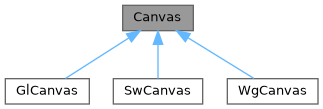
An abstract class for drawing graphical elements. More...
#include <thorvg.h>
Public Member Functions | |
| const std::list< Paint * > & | paints () const noexcept |
| Returns the list of paints currently held by the Canvas. | |
| Result | add (Paint *target, Paint *at=nullptr) noexcept |
| Adds a paint object to the canvas root scene. | |
| Result | remove (Paint *paint=nullptr) noexcept |
| Removes a paint object or all paint objects from the root scene. | |
| Result | update () noexcept |
| Requests the canvas to update modified paint objects in preparation for rendering. | |
| Result | draw (bool clear=false) noexcept |
| Requests the canvas to render the Paint objects. | |
| Result | viewport (int32_t x, int32_t y, int32_t w, int32_t h) noexcept |
| Sets the drawing region of the canvas. | |
| Result | sync () noexcept |
| Guarantees that drawing task is finished. | |
An abstract class for drawing graphical elements.
A canvas is an entity responsible for drawing the target. It sets up the drawing engine and the buffer, which can be drawn on the screen. It also manages given Paint objects.
Adds a paint object to the canvas root scene.
Appends a paint object to the root scene of the canvas. If the optional at parameter is provided, the paint object is inserted immediately before the specified paint in the root scene. If at is nullptr, the paint object is appended to the end of the root scene.
| [in] | target | A pointer to the Paint object to be added to the root scene. This parameter must not be nullptr. |
| [in] | at | A pointer to an existing Paint object in the root scene before which target will be inserted. If nullptr, target is appended to the end of the root scene. The default value is nullptr. |
target object is transferred to the canvas upon successful addition. To retain ownership, call Paint::ref() before adding it to the canvas.
|
noexcept |
Requests the canvas to render the Paint objects.
| [in] | clear | If true, clears the target buffer to zero before drawing. |
| Result::InsufficientCondition | The canvas is not properly prepared. This may occur if Canvas::target() has not been set or if draw() is called multiple times without calling Canvas::sync() in between. |
|
noexcept |
Returns the list of paints currently held by the Canvas.
This function provides a list of paint nodes, allowing users to access scene-graph information.
Removes a paint object or all paint objects from the root scene.
This function removes a specified paint object from the root scene. If no paint object is specified (i.e., the default nullptr is used), the function performs to clear all paints from the root scene.
| [in] | paint | A pointer to the Paint object to be removed from the root scene. If nullptr, remove all the paints from the root scene. |
|
noexcept |
Guarantees that drawing task is finished.
The Canvas rendering can be performed asynchronously. To make sure that rendering is finished, the sync() must be called after the draw() regardless of threading.
|
noexcept |
Requests the canvas to update modified paint objects in preparation for rendering.
This function triggers an internal update for all paint instances that have been modified since the last update. It ensures that the canvas state is ready for accurate rendering.
| Result::InsufficientCondition | The canvas is not properly prepared. This may occur if the canvas target has not been set or if the update is called during drawing. Call Canvas::sync() before trying. |
|
noexcept |
Sets the drawing region of the canvas.
This function defines a rectangular area of the canvas to be used for drawing operations. The specified viewport clips rendering output to the boundaries of that rectangle.
Please note that changing the viewport is only allowed at the beginning of the rendering sequence—that is, after calling Canvas::sync().
| [in] | x | The x-coordinate of the upper-left corner of the rectangle. |
| [in] | y | The y-coordinate of the upper-left corner of the rectangle. |
| [in] | w | The width of the rectangle. |
| [in] | h | The height of the rectangle. |
| Result::InsufficientCondition | If the canvas is not in a synced state. |
 1.9.8
1.9.8